SHEIN Free Trial: How to Test Products and Join the Program
Advertisements

in Shein’s Free Trial Hub
A clear overview of the required steps — drawn from Shein’s official Help Center — to guide your entries smoothly.
Informational educational resource — Derived from public documentation in Shein’s Free Trial Help Hub. We have no affiliation with Shein. Candidate selection is selective and approval is never guaranteed. Always review the official terms for each campaign.
If you have ever navigated to the Free Trial portal, clicked around, and felt uncertain about the procedure — you are not alone. The journey becomes clear once you understand the order of operations.
Below is a practical overview of how users submit requests for a chance to be selected, review their status, and publish feedback. Selection is never guaranteed, but following standard guidelines helps prevent basic errors that eliminate candidates early on.
1Navigate to the Free Trial Hub
Sign in to your personal Shein profile. Within the mobile application, head to your account tab → More Services (or Extra Services) → Free Trial Center. On desktop browsers, locate Free Trial within the community or service menus.
Explore the catalog of active products. Offerings refresh frequently, meaning today’s selections might disappear in upcoming rotations.
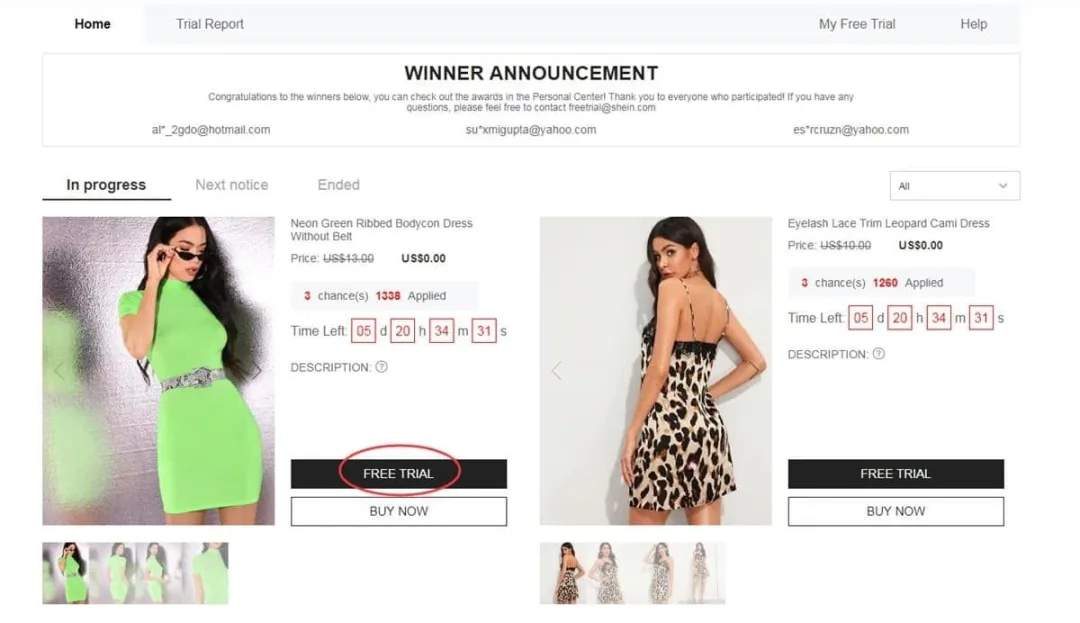
Sample navigation route into the Free Trial Hub (official reference diagram)
2Submit entries for up to 3 products weekly
You are allocated 3 application attempts every 7 days. Unused entries will not roll over into subsequent weeks.
When you spot a item you would like a chance to test out:
- Select Free Trial on the product page
- Pick your appropriate sizing
- Verify a delivery address situated in the same country as the Shein regional portal you are accessing
- Tap Submit
Crucial note: If your delivery address country differs from the site region, your submission may be invalidated. Re-check this detail carefully before confirming.
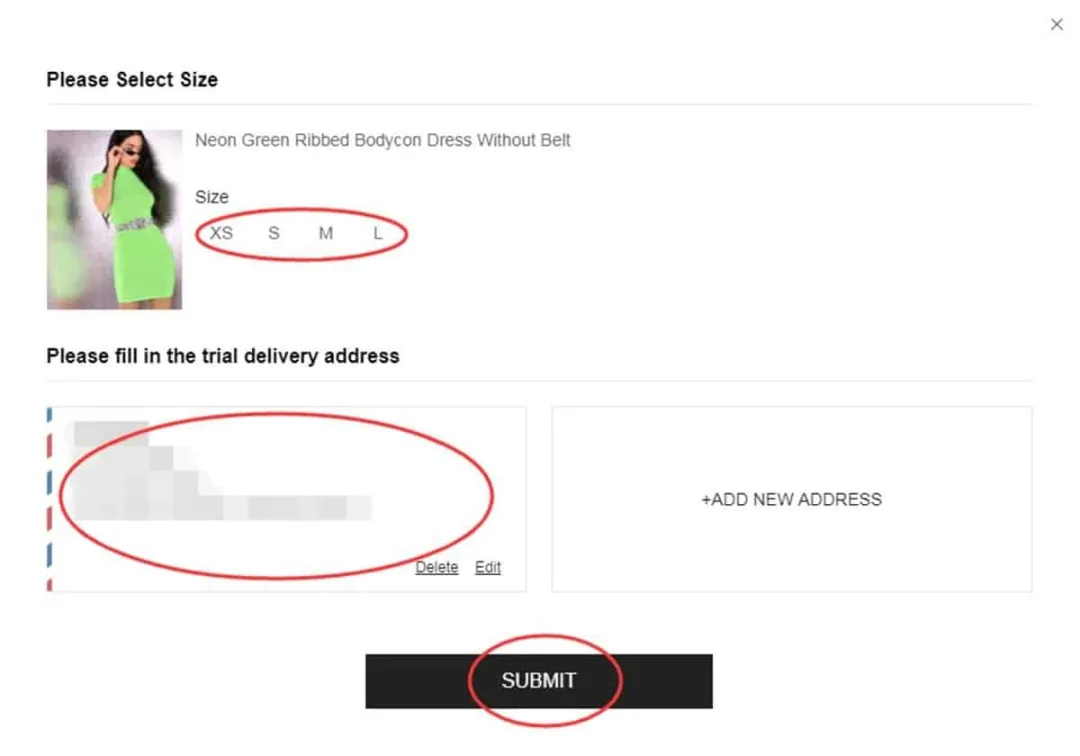
Sizing and address selection screen (from platform support material)
3Track status updates under My Free Trial
Evaluation typically requires approximately 7 days. Access My Free Trial / My Requests to monitor progress:
- Approved — Your profile was selected. An order is created at $0 balance and dispatched automatically.
- Failed — That particular request was not selected. You can apply again for different items during upcoming selection rounds.
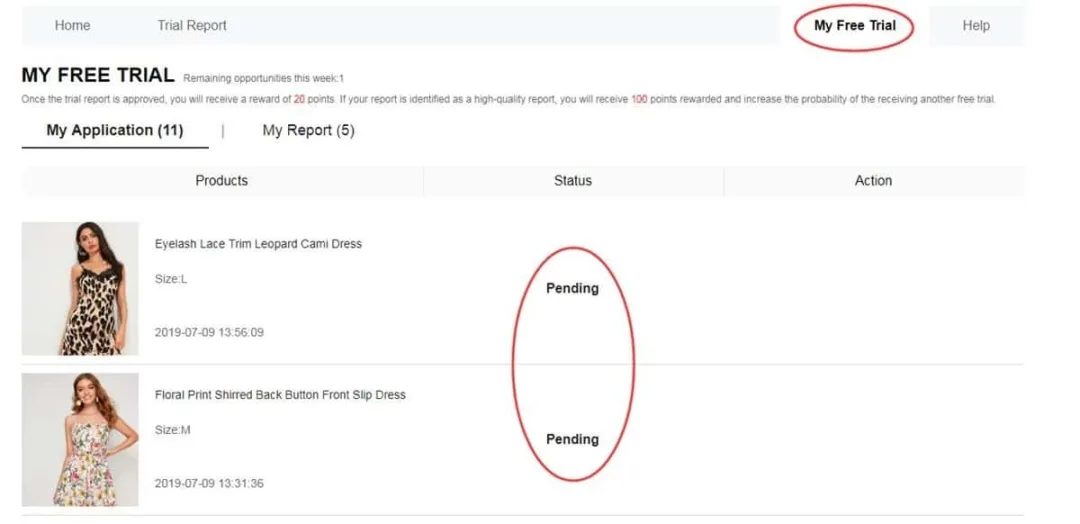
Dashboard showing Approved or Failed application updates
4If chosen, evaluate the item and submit feedback
If you are selected and the package arrives, test the item thoroughly while observing build quality, design, sizing accuracy, and fabric feel.
Next, post an in-depth, candid assessment via your account portal — ideally within 10 days of receipt. Track your pending submissions in My Report.
Best practices for effective feedback:
- Constructive feedback detailing both strengths and drawbacks
- High-resolution photos — ideally a full-length outfit view along with close-ups of details
- Specific observations regarding fit, material texture, and real-world wearability
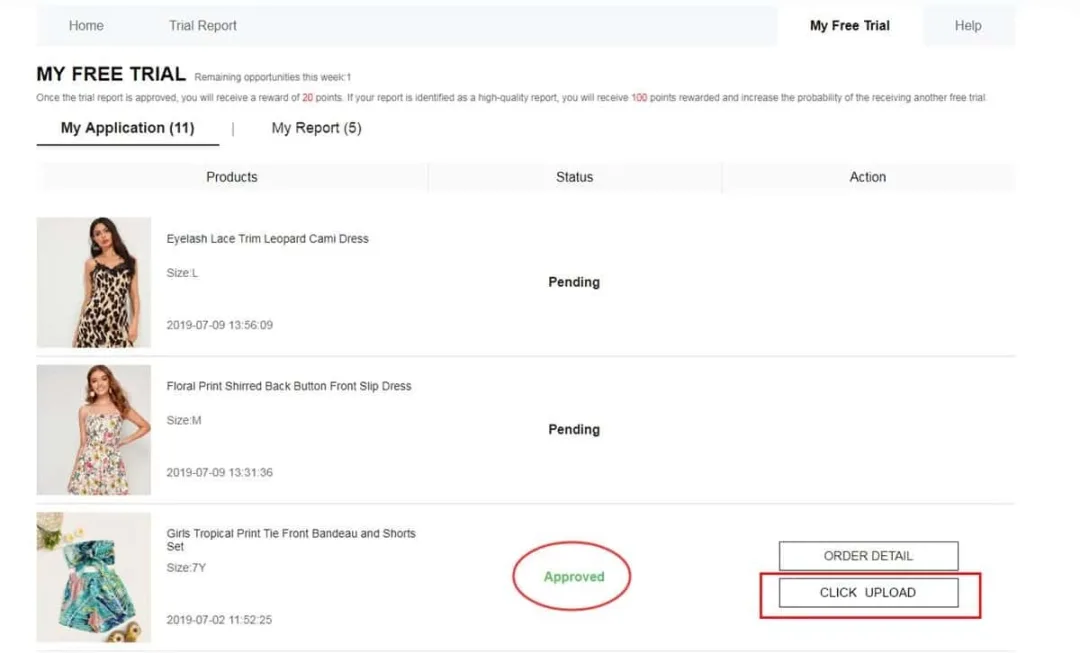
Feedback submission interface (official platform visual)
Regarding reward points: An accepted evaluation can yield around 20 reward points. A recognized High-Quality Report may grant up to 100 additional points.
If your initial submission gets turned down, you may receive one secondary attempt to revise and resubmit your review.
Important guidelines to remember
• Maximum of 3 application entries per week (non-transferable and non-cumulative)
• Destination address must match the regional domain of the Shein store in use
• Standard delivery is provided by Shein, though regional customs fees may apply depending on local laws
• Complete your review submission within 10 days following package receipt
• Duplicate or fraudulent accounts risk disqualification from future trial opportunities
• Failing to post required reviews can diminish selection odds in future draws
Frequent errors that lead to rejection
❌ Incomplete profile details or inaccurate sizing selections
❌ Using a shipping address outside the current site’s target nation
❌ Applying late after high-demand item quotas are already saturated
❌ Submitting brief, low-effort reviews lacking authentic photo evidence
❌ Missing the designated deadline for feedback submission
❌ Operating secondary accounts to bypass weekly entry limits
Frequently asked questions
Is there a shipping charge involved?In standard Free Trial cases, Shein absorbs delivery costs. Depending on regional regulations, international import duties could occasionally apply.
How many items can I request at once?You can enter up to 3 selections per week. Unused entries expire at the end of each cycle and do not carry forward.
Do selected users get to keep the product?Yes. In the official program, users who are chosen permanently retain the item once their required feedback report is uploaded and approved.
How quickly are selection decisions processed?Determination generally takes around one week. You can verify your status (Approved or Failed) within the My Free Trial menu.
What happens if my review is not accepted?You are typically granted one opportunity to edit and re-upload your feedback. Be sure to carefully adhere to image and detail criteria.
Is a large social media audience necessary?No. Detailed evaluations, clear images, and genuine app engagement carry far more weight than follower counts.
That summarizes the entire workflow: enter the Free Trial Hub → request up to 3 items weekly → monitor your status → if selected, receive the package → post an authentic review complete with images. Maintain updated profile details, enter early when catalog rotations open, and fulfill all review tasks.
Interested in trying your chance in the Free Trial Hub?
Explore current options and apply for an opportunity using the recommended steps above. Participant selection is conducted by system criteria and is never guaranteed.
ENTER THE FREE TRIAL HUB NOWYou will be navigated to Shein’s official Free Trial Hub page.
Reference documentation: Shein Free Trial Help Hub